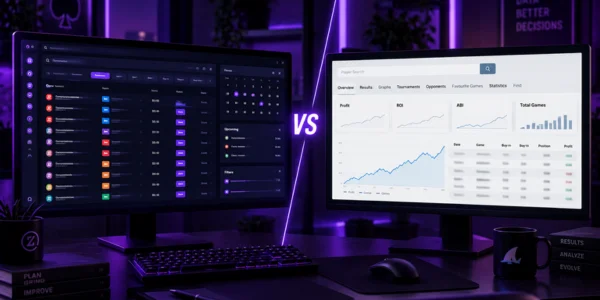
Two of the tools that come up in any serious conversation about an MTT grinder’s software stack are Lobbyze and SharkScope. And almost inevitably, someone asks: which one is better? The right answer is to reframe the question: they don’t compete. They solve completely different problems.
This guide explains exactly what each one does, which categories of problems they solve, where their features overlap (spoiler: almost nowhere) and where neither of them helps. By the end, you’ll understand exactly why serious grinders run both side by side instead of picking one.
The initial confusion that needs clearing up
A lot of newer grinders mix up Lobbyze and SharkScope because both deal with “poker tournament data.” But that’s a misleading generalization.
Lobbyze works with forward-looking data: tournaments that are about to start, the schedule of what’s coming up, alerts for what you need to register. It’s built for planning ahead.
SharkScope works with historical data: the complete tournament history of any player, cumulative ROI, ITM percentage, winnings over time. It’s built for analyzing the past.
One organizes your next session. The other helps you understand who you’re about to play against. They sit on completely separate axes of your operation, and that’s what makes them complementary rather than competitors.
What does Lobbyze solve?
Lobbyze is a schedule management and tournament operations tool. Its job is to handle the grinder’s day-to-day logistics and planning.
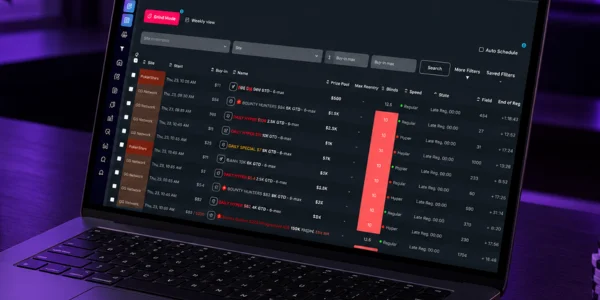
Centralized schedule. Tournaments from multiple sites in a single interface. PokerStars, GGPoker, 888poker, partypoker, WPN/ACR, Winamax, WPT Global, Chico Network, iPoker, Bodog, CoinPoker and SupremaPoker all show up together, with filters for buy-in, format, start time and guarantee.
Smart alerts. Automatic notifications when important tournaments are about to start, when late registration is closing, and when series are running.
Built-in bankroll tracking. Automatic logging of buy-ins, cashes and cumulative ROI. You stop maintaining side spreadsheets and start seeing real data in real time.
Performance metrics. ROI, ITM%, ABI, hourly, and result distribution by format and site. Data that informs strategic decisions about where and how to invest your time.
Team management. For professional operations with multiple players, dedicated auditing and coordination features.
In short: Lobbyze answers “when, where and what to play” and “how much am I winning.” It’s the grinder’s central operations hub.
What does SharkScope solve?
SharkScope is a historical player-lookup tool. Its job is to help you analyze specific opponents.
Screen name search. You type in any player’s username and get a full rundown of their tournament history: total tournaments played, average ROI, ITM%, total winnings, biggest scores.
Breakdown by format. You can see how a given player performs in MTTs vs. Sit & Gos, freezeouts vs. PKOs, turbos vs. regular-speed. Patterns that show where they have an edge and where they don’t.
Performance graphs over time. You can see whether a player is on a recent upswing or downswing, whether their ROI is trending up or down, and whether they’re moving up or down in buy-ins.
Rankings and comparisons. You can compare players against each other and identify top performers in a given format or time period.
Alerts on tagged players. You can tag specific players and get notified when they register for tournaments.
In short: SharkScope answers “who am I playing with” and “what is this player good at.” It’s the historical database for understanding your opponents.
Where do the features overlap?
If you look closely, you’ll find minimal overlap between the two tools.
Your own stats. Both can show your own ROI and ITM% if you set them up to. But that overlap is superficial: Lobbyze ties into your bankroll for day-to-day operations, while SharkScope only gives you a look back.
Format filters. Both let you filter data by format (MTT, SNG, cash game). But the data itself is opposite: Lobbyze filters tournaments available to play, SharkScope filters tournaments your opponents have already played.
Multiple languages. Both are available in more than one language, including English and Portuguese.
Beyond those small overlaps, the tools cover completely different ground.
The full MTT grinder cycle
To see why you need both, look at the real operating cycle of a professional MTT grinder.
Before the session. The grinder opens Lobbyze to review available tournaments. They filter by buy-ins that fit their bankroll, pick the best spots for the time they have, register for some and set alerts for others. SharkScope doesn’t help here: you’re planning what you’ll play, not analyzing who’ll be playing.
During the session. The grinder plays the tournaments they selected. If they run into a specific opponent they want to understand better, they open SharkScope and look up the screen name. They check average ROI, ITM% and total tournaments played, then adjust their strategy to that specific profile. Lobbyze doesn’t help here: you’re already at the table and need data on the player across from you.
After the session. The grinder logs results in Lobbyze. Bankroll and performance metrics update automatically. If an opponent caught their attention, they make a note to check that player’s full history in SharkScope later.
On the weekend. The grinder reviews the week in Lobbyze. They look at cumulative ROI, ITM% for the period and performance by site, see where they had an edge and where they didn’t, and adjust strategy for the next week. SharkScope doesn’t come in here: this is analysis of your own game, not your opponents’.
Studying specific regs. The grinder notices a few opponents who keep showing up in tournaments at the same buy-in. They dig deep into each one on SharkScope to understand which games they play, their style and their history, then tag them in SharkScope to get alerts when they register for new tournaments. Lobbyze doesn’t help here: you’re doing historical research on specific players.
Every point in the cycle has its ideal tool. Swapping Lobbyze for SharkScope before the session is impossible: SharkScope doesn’t show upcoming tournaments. Swapping SharkScope for Lobbyze for opponent research is impossible: Lobbyze doesn’t have aggregated history on every player.

Where neither one helps
Recognizing the limits of both tools is just as important as recognizing their strengths.
Analyzing your own hands. Neither Lobbyze nor SharkScope analyzes hand histories in depth. To review specific decisions, find technical leaks and see detailed stats on your own game, you need a tracker (PokerTracker 4 or Holdem Manager 3).
Real-time reads at the table. Neither Lobbyze nor SharkScope displays opponent stats in real time while you play. For that, you need a HUD (built into your tracker).
Theoretical study of specific spots. Neither Lobbyze nor SharkScope calculates GTO solutions or analyzes balanced ranges. For that, you need a solver (GTO Wizard, PioSOLVER).
Strategy coaching. Neither Lobbyze nor SharkScope replaces working with a coach or a study group. Human analysis of complex decisions is still irreplaceable.
Mental game work. Technical tools don’t fix tilt, anxiety or discipline problems. Check out our piece on emotional control in poker for this essential layer of the game.
No tool is a complete solution. Each one covers a specific part of the problem. Professional grinders understand that and build a stack that covers every dimension.
How Lobbyze and SharkScope connect in practice
The practical connection between the two tools happens at specific points.
Spotting regs at a given buy-in. You notice in Lobbyze that you played a lot of $30 tournaments last week. Some screen names keep popping up. You look those players up on SharkScope to find out whether they’re fish (profitable to play against) or regs (requiring a more careful approach).
Selecting tables or tournaments with softer fields. If SharkScope shows you that a particular series has a high percentage of recreational players, use Lobbyze to filter that series’ tournaments at your target buy-ins.
Bubble and final table analysis. When you get close to the bubble or the final table, you have time to check your opponents on SharkScope. Combine that information with a solid understanding of ICM in poker to make more precise decisions.
Long term: analyzing field trends. Over months, you use aggregated data from Lobbyze (your own ROI by site) and SharkScope (field strength on each site) to decide where to concentrate your volume.
This integration comes naturally with use. You start switching between the tools at specific points in your day without thinking much about it, each one solving its part of the puzzle.
When to prioritize each tool
If you’re building your stack and need to prioritize spending, a few criteria help.
Lobbyze should come first for most grinders. It handles the daily logistics that affect every session. Without it, you miss tournaments, make suboptimal selections and work with disorganized data. The ROI shows up in the first week.
SharkScope comes later, as your volume grows. While you’re playing low stakes with big, constantly rotating fields, deep analysis of specific opponents pays off less. Once you start facing the same regs over and over, SharkScope becomes essential.
Exception: high-stakes pros. If you play high stakes, where the same dozen regs show up constantly, a paid SharkScope subscription on an advanced plan can be as much of a priority as Lobbyze.
For most serious grinders, the natural path is Lobbyze first, SharkScope later (starting with the free version and moving to paid as needed).
Common mistakes when deciding between the two
Five mistakes come up again and again.
Trying to choose between them. As we’ve covered throughout this article, they don’t compete. Picking one to “save money” leaves half the problem unsolved.
Investing in SharkScope before Lobbyze. For a grinder who’s still growing, flipping those priorities slows down progress. Start with the tool that fixes your biggest daily bottleneck.
Sticking to the free versions of both. At real volume, both hit their ceiling quickly. Accepting an eventual upgrade is part of moving up.
Ignoring how they fit into your full stack. Lobbyze and SharkScope solve specific parts of the problem. Without a tracker, a solver and other complementary tools, your stack is incomplete.
Not connecting data to decisions. Having Lobbyze and SharkScope without using the data they generate to make strategic decisions means underusing your tools. Our article on key metrics like ITM and ABI goes deeper into how to get real value out of the numbers.
Conclusion
Lobbyze vs. SharkScope is the wrong comparison. The tools solve fundamentally different problems: Lobbyze is schedule management and operations, SharkScope is historical opponent analysis.
Professional grinders use both side by side, each at the right moment in their operating cycle. Lobbyze to plan, handle logistics and track their own performance. SharkScope to research specific opponents and understand fields.
Prioritize Lobbyze first if you’re still growing and need to sort out your daily logistics. Add SharkScope as you identify recurring opponents worth a deep dive. Combine both with a tracker, a solver and other tools for a complete stack.
Don’t choose between them. Use both the right way.