If your budget only covers one subscription at a time, the order that holds up in real day-to-day grinding is: first the tool that organizes your schedule, then the one that tracks results, then the one you study with. The reason is easy to check against your own week: a schedule mistake costs you money every single day (a missed tournament, a buy-in outside your bankroll, a session that drags past 2 a.m. for no good reason), while a range mistake costs you money in spots that come up a few times per session. A study tool improves your decisions inside a hand. A schedule tool improves the decision about which hands you’ll be playing that day, and that decision comes first.
This article breaks down the categories of paid tools that show up in an online tournament player’s routine, who each one is worth it for, and when it stops being a luxury. It’s not a product list with star ratings: it’s a map of which problem each type of software solves, so you can compare subscriptions knowing what you’re actually buying. If you want the breakdown by selection criteria (multitabling, operating system, type of grind), that’s covered in our comparison of the best MTT software and who each one is for.
What problem does each tool category solve in an MTT player’s routine?
Each category solves a problem at a different point in your day: before you sit down (schedule), during the session (tracker, HUD, alerts), after the session (hand review, solver) and away from the tables (bankroll management, team and staking). A tool bought for the wrong moment looks useless, even when it’s good.
It pays to look at your whole day before subscribing to anything. An MTT grinder spends time in four blocks: picking and registering tournaments, playing, logging what happened and studying. The bottleneck is almost never where people think it is. A player who complains about “not improving” is often playing the wrong schedule, with four tournaments that all wrap up at the same time and two that start when he’s already burned out. In that case, a solver fixes nothing.
| Category | Problem it solves | Who misses it first | Free alternative in the meantime |
|---|---|---|---|
| Schedule manager | Picking, filtering and planning which tournaments to play, with end times and buy-ins within your limit | Anyone playing more than 4 tournaments per session or on more than one site | A spreadsheet with your regular weekly tournaments, rebuilt by hand whenever the schedule changes |
| Tracker and HUD | Logging results per tournament and showing opponent data during the hand | Players who already have volume but can’t say which format is profitable | Manually logging buy-ins and cashes in a spreadsheet, with no opponent stats |
| Solver and study tools | Giving you a reference for how to play a specific spot with a defined stack and position | Players who have fixed the basics and keep making mistakes in recurring short-stack spots | Free push/fold charts and hand discussions with other players |
| Hand review and replayer | Reviewing hands away from the heat of the session and tagging what to go over later | Players who finish a session feeling they made mistakes but can’t remember where | The poker site’s own hand history, read manually |
| Team and staking | Tracking who sold how much, to whom, and settling up without arguments | Teams with more than two players selling action | A shared spreadsheet with settlement rules written down before you start |
| Registration automation and alerts | Letting you know a tournament is about to start and cutting down on missed registrations | Players who miss late registration because they forget | Phone alarms and a list of start times taped to your monitor |
The honest read of this table is that the right-hand column works for a while. The subscription comes in when keeping the free solution running starts eating more time, or causing more mistakes, than paying would cost, and that point is different for everyone. The cutoff between the two is covered in detail in our comparison of free vs. paid poker tools.
Schedule manager: what does it do and who misses it first?
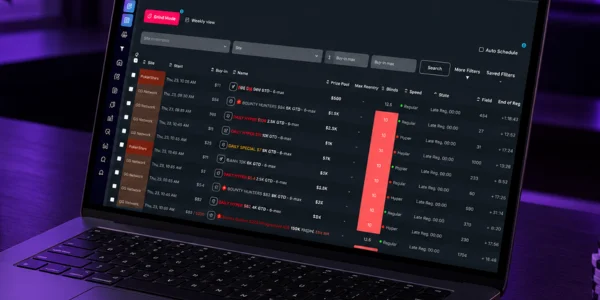
A schedule manager pulls the tournament schedules from multiple sites into one place, lets you filter by buy-in, format, start time and structure, and builds your schedule for the day before you even open the lobby. Players on more than one site miss it first, because that’s when the spreadsheet starts falling behind.
The concrete problem it tackles: the schedule changes and your spreadsheet doesn’t. When a site moves the start time of its main event or adds a series, your weekly schedule is already wrong and you only find out once the tournament is underway. The other problem is stacking start times. Registering six tournaments that open between 8 and 8:30 p.m. means six bubbles hitting at almost the same time and no attention left for the stage that decides the money.
The practical fix is to build your schedule around end times, not start times: if you want to be done by 1 a.m., a deep-structure tournament starting at 10:30 p.m. is out, even if the buy-in fits. A schedule tool is there so you see that before you click register, and that’s exactly what Lobbyze does as a tournament schedule manager. If you play two or three regular tournaments a day, always on the same site, a spreadsheet still gets the job done.
Do a tracker and HUD give you the same value in tournaments as in cash games?
No. In cash games, a HUD tends to rack up hundreds of hands against the same regs at the same table; in tournaments, tables break, stacks change constantly and the sample on each opponent is usually small. What a tracker really gives you in MTTs is your own results, organized by format, buy-in and time of day.
That’s the part most players underrate. Knowing you’re profitable in low buy-in turbos and losing in mid buy-in deep-stack events changes your whole weekly schedule, and that information only exists if you consistently log every tournament you play. It’s also what lets you answer whether that bad month was variance or bad game selection.
As for HUDs in tournaments, the defensible use is broad tendency stats over a large sample (preflop aggression, button steal frequency), not fine reads off 30 hands. A player who makes a 15-big-blind shove decision based on a number from a tiny sample is using the HUD as decoration. Before subscribing, double-check which sites and formats the tool supports, because that varies and it’s the difference between complete data and half the picture.
When does a solver start making a real difference?
A solver starts making a difference once your mistakes are no longer about discipline and have become about range construction in spots you face every session. Before that, it gives you the feeling of studying without changing your results.
The test is simple: take your last ten tournaments and count how many of your big losing hands came from spots with 10 to 25 big blinds, and how many came from playing tournaments outside your bankroll, tired or on tilt. If the second column is bigger, your solver subscription money is going to the wrong place. Our material on emotional control in poker will do more for you in that scenario.
When the solver does come in, the way to get value from it is to pick one specific spot per week (for example: defending the big blind against a button open with 20 big blinds effective, six-handed) and compare the solver output with what you actually did in that week’s hands. Running random trees and staring at color-coded charts for half an hour doesn’t stick. If you’re still building your hand-reading foundation, you’ll get more out of our guide on how to read and build poker ranges before paying for a study subscription.
What does a hand review and replayer tool do for your next-day review?
It separates the moment you play from the moment you judge. During the session you decide in seconds without knowing the outcome; the next day you look at the same hand knowing what happened, which is useful for evaluating the decision and terrible for evaluating the result.
This is the category a lot of people look for by typing check replay poker or checkreplay into a search engine, along with tools that track results and bankroll, searched for as control poker or controlpoker. What these searches have in common is the next day: the player wants to see the hand again, tag it and file it away. Before subscribing to any of them, check directly with the developer which sites it reads and what hand history format it imports, because a replayer that can’t open your site’s files is a subscription collecting dust.
The habit that makes this category worth the money is tagging no more than three hands per session, while you’re still playing, and reviewing only those. A grinder who saves forty hands never reviews any of them. There’s only one question to answer for each: with the information I had at that moment, was this the best line? If the answer depends on the card that came afterward, the hand shouldn’t be on the list.

When is it worth paying for team and staking tools?
It’s worth it once more than two people are selling or buying action within the same group, or once settlements start involving makeup. With two players and simple rules, a shared spreadsheet does the job. With five players, different percentages per tournament and accumulated debt, the spreadsheet becomes a source of arguments.
The problem the tool solves isn’t math, it’s record-keeping: who sold how much, at what markup, in which tournament, and what was left outstanding from last month. Brazilian teams often look for this category under names like clique team poker, and the thing to watch when subscribing is the same as in the other cases: ask to see how the tool handles makeup and partial settlements before putting the whole team on it, because migrating staking history in the middle of the month is a pain.
One rule that heads off most of the friction, regardless of software: the deal is written down before the first tournament, it covers what happens if the player stops playing mid-cycle, and it lives somewhere both sides can open. A good tool keeps that on record; it doesn’t replace the agreement.
Registration automation and alerts: what do poker sites allow and what don’t they?
The line sites usually draw is between informing you and acting for you. Alerts, reminders, notifications and schedule organization are treated as player support. Software that registers on its own, clicks around the lobby, plays the hand or reads the client screen falls into territory the terms of service prohibit, with the risk of having your balance confiscated and your account closed.
The catch is that each operator writes its own rules, and they change. A tool that was accepted on one site may be on another site’s banned list, and the list of permitted programs is published and updated by the operator itself. Before installing anything that touches the poker client, read the software policy of the site you play on and, if in doubt, ask support in writing and save the reply. Our comparison of the top online poker sites in Brazil helps you know who you’re dealing with.
In practice, what fixes most missed-registration problems is alerts, not automation: a heads-up a few minutes before the start and before late registration closes, with the tournament already picked in the morning. That’s also why so many people search for an online poker app when all they want is a phone notification when a tournament they’ve already planned is opening.
How to compare subscriptions: price, trial, cancellation and support
Compare four things before the monthly price: whether there’s a free trial with access to the feature you actually want, how you cancel (inside the product or by email), what happens to your data after you cancel, and in what language and how quickly support responds.
A trial that only unlocks a stripped-down version doesn’t test anything. What you need to check during the trial is the integration with your poker site and your operating system, because that’s where most frustrations show up. Do it on day one of the trial, not the last day.
Cancellation and data go hand in hand. Ask whether you can export your history, your schedule or your staking records when you leave, and in what format. A tool that holds your history hostage costs more than it looks, because leaving means starting from scratch. As for support, the real test is sending a specific question during the trial period and timing the reply. A side-by-side comparison of schedule, tracking and study criteria is in our poker tools comparison.
In what order should you subscribe if your budget allows one at a time?
Subscribe to the schedule manager first, then the tracker, then hand review, and hold off on solvers and team tools until there’s a concrete reason. The order follows how often each mistake happens: a bad schedule costs you every day, a bad range costs you in specific spots.
Step one, schedule: you stop missing tournaments because you forgot and stop building sessions that end way too late. Step two, tracker: after two or three months of logging, you know which format and which buy-in range give you a return, and the schedule from step one gets better with that data. Step three, hand review: with the routine of tagging three hands per session, your study has an actual agenda instead of generic topics.
The solver comes in at step four, and only when the hands you tag start repeating the same type of spot, a sign the problem is technical and not discipline. Team and staking tools sit outside this queue and are triggered by an event: the day your group goes past two people selling action. If you’re putting together your starter kit, the core list is in essential tools for serious poker players.
What do other tools do better than Lobbyze?
A dedicated tracker does everything involving hand histories and opponent stats better: a schedule manager doesn’t replace a hand database, doesn’t draw a HUD and won’t tell you the 3-bet frequency of the player on your left. If you want that, you need a tracker, period.
A solver does the technical work on ranges and bet sizing better, at a level of detail no organization tool delivers or even tries to. A hand review tool does visual replays better, with tagging and sharing for group discussion. A staking tool does tracking of sold action, makeup and settlements across multiple people better. In all these cases, the comparison isn’t about quality, it’s about function: they’re different problems.
There’s also the situation where no subscription is justified: a player who plays two regular tournaments a week, on the same site, at low buy-ins, has the schedule problem solved by memory. Recommending a subscription in that scenario would be selling the wrong product. For that player, the shortest path is learning tournament selection, which is the topic of our guide on how to choose the best tournaments to start with.
Conclusion: the decision that shapes all the others
The main decision isn’t which brand to subscribe to, it’s figuring out at which point in your day you’re losing money. A grinder who loses money on schedule selection buys study software and keeps losing for the same reason, now with one more subscription. Whoever fixes the schedule first gets to the solver with tagged hands, a study agenda and logged results to measure whether the study is working.
Every category described here has an objective trigger: number of tournaments per session, number of sites, type of mistake showing up in your tagged hands, number of people selling action. Use the trigger as your criterion, test the integration before paying for the second month and confirm with each site which programs are allowed. More content on scheduling, strategy and tools is collected on the Lobbyze blog.
Frequently asked questions
Where can I find tournament schedules and filter by exact format and buy-in before registering?
In a schedule manager, which pulls the sites’ schedules into a single list you can filter by buy-in, format, start time and structure. The site’s own lobby also has filters, but it only shows that operator’s tournaments and doesn’t save your weekly plan. If you play on more than one site, cross-site filtering is the practical difference between the two options.
Is there a poker platform that emails you when a tournament is about to start?
Tournament notifications come in several forms (email, push notifications on your phone, alerts in the poker client), but what’s available varies from operator to operator and from tool to tool, so check what your site and your tool actually support before you rely on it. What doesn’t change: an alert is information, and it’s treated differently from software that registers for you.
What is grinding in poker?
Grinding means playing with volume and consistency, treating poker as a routine rather than isolated sessions: the same buy-in range, a planned number of tournaments per session and results logged over months. People who search for poker grind are usually looking for how to organize that volume, and that’s where a schedule manager and a tracker come in before any study tool.
Do I need a tracker if I only play tournaments?
You do if you want to know which format is profitable for you, and that answer only shows up with consistent logging of every tournament. The HUD side is less valuable in MTTs than in cash games, because tables break and the sample on each opponent stays small. Subscribe with your own results reports in mind, not opponent stats.
Can auto-registration software get my account in trouble?
It can, when the program acts in place of the player: registering on its own, clicking around the lobby or making decisions at the table. Poker sites’ terms of service usually prohibit this, and penalties can include account suspension and confiscation of your balance. Each operator publishes its own list of permitted software, so you need to check site by site, in writing, before installing anything.
Is it worth getting a solver right from the start?
Not if your mistakes are still about tournament selection, bankroll or tilt, because a solver doesn’t touch any of those three. It starts paying off when the hands you tag for review keep repeating the same technical spot, with similar stacks and positions. Until then, free push/fold charts and hand discussions get you almost the same thing.
Can I use just one tool and cover everything?
No, because the categories solve problems at different points in your day and none of them covers another’s scope well. What you can do is pick the one that attacks your current bottleneck and stick with free solutions for the rest until the bottleneck moves. Revisiting that choice every two or three months keeps you from piling up subscriptions you never open.