Solvers, trackers and schedule managers solve different problems, and the order you buy them in matters more than which brand you pick. If you play online MTTs and don’t pay for any of the three yet, the sequence that usually pays off fastest is schedule manager first, then tracker, then solver. It comes down to frequency: selection and timing mistakes show up in every tournament you play all month, while a bad line in one specific spot only shows up in some of them.
That order isn’t universal. It changes if you only play a few sessions a week, if you’ve already got your schedule handled some other way, or if your game has reached the point where the edge really is in the decision tree. Below is a test to find your own order, plus a way to review the decision after 30 days so you don’t make the same wrong call when next month’s subscription renews.
What do a solver, a tracker and a schedule manager each solve, in one sentence?
A solver tells you how a hand should be played against an opponent who plays well. A tracker tells you what you actually played, against whom, and with what result. A schedule manager tells you which tournaments you enter, on which sites, and at what time.
A solver works away from the tables, on a single hand with parameters you set: effective stacks, board, opening ranges, bet sizing. It gives you betting, checking and folding frequencies for every card. It’s a study tool, not a session tool, and the most straightforward definition of a poker solver helps explain why it’s useless as an in-session reference while you grind.
A tracker runs while you play and stores your hand histories. After the session, it lets you filter by position, stack depth and tournament stage, and pull up the replay of any hand to go back over the betting. In tournaments, most of its value is in that database, not in the HUD.
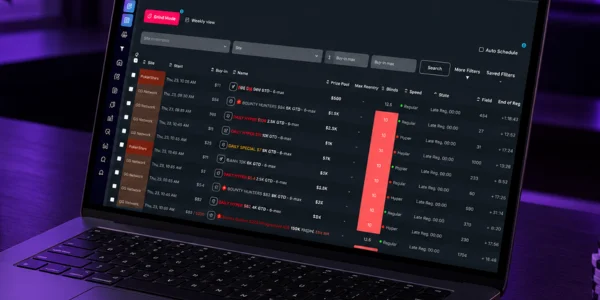
A schedule manager does its job before the first hand is dealt. It pulls tournaments from multiple sites into a single list, filters by buy-in, format, start time and late reg window, and builds your schedule for the day without you having to open every site’s lobby in the poker client. A tournament schedule manager for MTTs handles selection and scheduling, which are decisions you make with the poker software closed.
The table below puts the three side by side on the criteria that usually decide the purchase. For a deeper look at each category, check out our comparison of poker tools for scheduling, tracking and study.
| Tool | Problem it solves | When it’s worth buying | What it doesn’t solve |
|---|---|---|---|
| Schedule manager | Tournament selection and timing: which events make the cut for the day, on which sites, and how they overlap | When you miss tournaments because you forgot, register outside your planned window, or build your schedule by opening one site after another | How to play your hands, and what actually happened in them afterward |
| Tracker | A record of what you played: hand histories, results by format, by buy-in and by site | When your schedule is already stable and you can’t say which format or stack depth is bleeding chips | Tournament selection, and the theoretically correct decision in each spot |
| Solver | A theoretical baseline for how a hand should be played against strong opposition | When you’ve already isolated a mistake in a recurring spot and need a reference to fix it | Anything outside the hand being analyzed: schedule, volume, game selection and bankroll management |
How do you tell whether you’re losing more to selection, execution or study?
You can separate the three using the history you already have, without buying anything. Selection is what happens before the tournament starts, execution is what happens with chips on the table, and study is what happens afterward, when you try to understand why the hand ended the way it did.
Pull your last 30 days of transaction history from the site and answer three questions with actual numbers. First: how many tournaments did you register with more than 30 minutes of late reg already gone, or skip because you remembered too late? Second: in how many sessions did you have three or more tournaments running deep at the same time, with simultaneous all-in decisions? Third: how many hands did you calmly review after losing, not in the heat of the session?
If the first number is the highest, money is leaking out through selection and scheduling. If the second is the highest, it’s an execution problem caused by overload: you play one table well and six tables badly. If the first two are close to zero and so is the third, the hole is in your study, but in that case the next step is building a review habit, not subscribing to a solver.
Be careful reading any of these numbers: tournaments are a small-sample format, and a bad 30-day stretch may say nothing about your game. Understanding how variance impacts online poker keeps you from buying a tool to fix a problem that was really just the distribution of results.
Why is a schedule manager usually the first buy for players who miss tournaments because of timing?
Because the cost of bad timing is silent and it hits every day. A good tournament you didn’t register for doesn’t show up anywhere: not in your transaction history, not in your tracker, not as a hand for the solver to analyze. It just disappears, and you never see the value you left on the table.
The typical pattern goes like this: you sit down at 7 p.m., open the lobby of your main site, register whatever is starting that minute and ignore the rest. Half an hour later, you jump into three bigger buy-in tournaments that are already halfway through late reg, just because they showed up on screen. By the end of the night, the schedule you actually played has nothing to do with the one you would have picked that morning with a clear head. The decision was driven by what was visible, not by what was worth playing.
A schedule manager fixes this by separating the moment you choose from the moment you play. You build the list ahead of time, filtering by max buy-in, structure and start time, and the session becomes executing what you’ve already decided. During a series, when the calendar triples in size, the difference becomes even more obvious, and that’s exactly the situation where building a series schedule in minutes replaces an hour of reading through the calendar.
There’s also a control benefit that doesn’t show up in any tool’s math: if you know when the last tournament on your schedule starts, you know when your session ends. Players who lock that in the day before make fewer impulse registrations late at night, which is exactly when fatigue has already dragged down the quality of their decisions.
What does a tracker show you in tournaments that you can’t see without one?
It shows your own game broken down by context. Without a tracker, you remember the memorable hands and forget the rest, and memory is a sample biased toward whatever hurt.
There are four filters that pay off most in MTTs. Results by buy-in, which often reveal that the higher stakes you jump into on impulse are dragging your bottom line down. Results by format, splitting turbo, regular-speed, PKO and freezeout, because plenty of players win in one and lose in another without realizing it. Opening frequency by position at short stack depths, measured in big blinds, which is where tournament mistakes repeat the most. And where you bust: at which stack depth you die most often, between 10 and 20 big blinds or with a big stack on the bubble.
The second use is the replayer. Flagging two hands per session and reviewing each one afterward, with the full betting sequence and everyone’s stacks, produces more improvement than running ten random sims. Checking the replay is what turns a feeling (“I think I paid off too light on the river”) into a concrete case to study.
The tracker’s limit in tournaments is sample size. A hundred tournaments is too few to draw conclusions about ROI, and any read at that volume should be treated as a hypothesis. Action frequencies are different: they repeat many times within each tournament, so the sample grows quickly and the read becomes reliable much sooner.

When does a solver not make a difference in your game yet?
When you still can’t name the spot you want to solve. A solver doesn’t find your mistake; it answers a question you’ve already framed, with stacks, position and ranges defined. Without that question ready, your time in the software turns into staring at pretty charts that never carry over to the table.
There are three clear signs that buying one is premature. You quit sessions on tilt fairly regularly, in which case the problem is self-control, not theory. You still pick your buy-ins based on whether you feel lucky that day, which is a bankroll problem. Or you’ve never been able to describe, in one sentence, a mistake that keeps repeating in your game. The solver solves the fourth case, the player who already has that sentence ready: something like “I overdefend the big blind against button opens at 25 big blinds.”
What solvers and trackers do better than any schedule manager
It’s worth saying plainly, because the difference is real. No schedule manager, Lobbyze included, analyzes your hands. It doesn’t know whether you made the right call on the river, it doesn’t calculate equilibrium frequencies, it doesn’t build defending ranges, and it gives you no theoretical reference for any spot. That’s solver territory, period, and if you’ve already solved selection and timing, you have nothing to gain by swapping a solver for a calendar organizer.
Likewise, no schedule manager stores your hand histories or opens a replayer. If the question is “what did I do in that hand,” the answer is in your tracker and nowhere else. The three tools don’t compete for the same job; they compete for the same subscription budget, and that’s the only reason the order needs to be decided.
Does the order change depending on how much volume you play?
Yes, quite a bit. Volume determines how much each mistake costs you per month, and that monthly cost is what should drive the purchase.
Low-volume players: where to start
Below roughly three sessions a week, your schedule is the most expensive bottleneck, because every missed tournament is a big slice of your month. If you play two nights a week and let two good tournaments slip by because you forgot, you’ve lost a meaningful share of that period’s opportunities. Start with a schedule manager, and use the time you save building your schedule to manually review two hands per session, keeping the hand histories exported by the site itself.
At that volume, a tracker doesn’t pay off much in the short term: format and buy-in breakdowns take months to build up a sample. A solver pays off even less, because the spot you’d solve today might not come up again for weeks. If your first decision is between software and a spreadsheet, our comparison of software vs. spreadsheets for building a poker schedule shows where a spreadsheet still holds up and where it breaks down.
High-volume players: how the order changes
Above roughly 15 sessions a month, playing multiple tables at once, you usually already have some kind of schedule management in place, even if it’s just a manual routine that works. That’s when the tracker moves up to first, because your volume has produced enough sample for the format and stack-depth breakdowns to actually mean something, and because execution mistakes multiplied across hundreds of tournaments cost more than selection mistakes.
The solver comes third, fed by whatever the tracker flagged. That’s the order that makes the three connect: your schedule defines what you play, the tracker points to where your results drop, and the solver answers the specific question the tracker raised. Players who flip it and start with a solver end up studying the spots they find interesting, not the ones costing them money. It’s also worth checking that your schedule is right before digging into execution, and the criteria for choosing which poker tournaments to play change with structure and late reg.
How do you decide when you can only afford one subscription at a time?
Pick the tool that targets the mistake with the highest monthly frequency, not the one that fixes the most severe mistake. An expensive mistake that happens twice a month costs less than a medium one that happens in every tournament.
Some simple math covers most cases. Estimate how many tournaments you missed or registered at the wrong time over the last 30 days and multiply by your ABI: that’s the approximate monthly cost of your scheduling problem, and it’s usually the easiest one to measure. Then estimate how many times you couldn’t explain why you lost: that’s the cost of your record-keeping problem. The third number, the cost of your study gap, can only be estimated once you have the second.
Two practical rules keep you from paying twice. Don’t subscribe to two tools in the same month, because you won’t be able to credit the improvement to either one. And don’t subscribe to a tool whose use depends on a habit you don’t have yet: a solver without a review routine sits unused, exactly like a tracker without a post-grind review session. The case for automating the schedule-building step is laid out in detail in why you should use software to build your poker schedule.
How should you review the decision after 30 days of use?
Compare the same metric that drove the purchase, measured before and after, not your monthly P&L. Tournament results swing too much to serve as a yardstick over 30 days.
If you bought a schedule manager, the metric is operational: how many tournaments from your planned list you actually played, and how many minutes it took to build your schedule for the day. If you planned 40 tournaments and played 38, versus 26 out of 40 the month before, the tool delivered what it promised, regardless of the financial result.
If you bought a tracker, the metric is discovery: how many concrete, data-backed hypotheses about your game you came up with, and how many hands you reviewed in the replayer. A month without a single specific note means the tool turned into decoration. If you bought a solver, the metric is transfer: how many spots you studied and were later able to recognize at the table, playing them differently than before.
In any of the three cases, a metric that hasn’t moved after 30 days has two possible readings, and it’s worth separating them before you cancel: either the tool wasn’t the bottleneck, or you were missing the routine it requires. The second is the more common one, and switching subscriptions without building the routine only changes the name of the software that sits unused. If you see poker as an exercise in method too, it’s worth noting that this discipline of measuring before and after is one of the skills poker builds away from the table.
In the end, the main decision is about which stage of your process is the loosest: the one that selects tournaments, the one that records what happened, or the one that studies the hand. Players who’ve never measured anything tend to overestimate the study stage, because it’s the most visible and the most talked about, and to underestimate the selection stage, because its cost never shows up in the transaction history.
Buy one tool at a time, with a metric defined before the purchase and a date set to review it. If after 30 days the metric hasn’t moved and you stuck to the routine, cancel without second thoughts and move on to the next one in line. The sequence matters more than the brand, and it’s yours to figure out with your own numbers.
Frequently asked questions
How do I build my schedule without opening one site after another?
Use a schedule manager that pulls tournaments from multiple sites into a single list and applies your filters all at once. The manual equivalent is opening each site’s lobby, logging start time, buy-in and structure in a spreadsheet and repeating that every day, which works with two sites and becomes unmanageable at four or more.
Where do I find the tournament schedule, and how do I filter by the game type and buy-in I want before registering?
The full schedule is in each site’s lobby, under the tournaments tab, with its own filters for format, buy-in and start time. A schedule manager runs the same filtering across multiple sites at once, so you don’t have to compare separate lists before deciding where to register.
Can I get an email alert when a tournament is about to start?
It depends on the site and the tool: some sites offer notifications inside the poker client and others don’t alert you at all. Check what your site and your tool actually support before you build your routine around it.
What is a poker site’s lobby?
The lobby is the site’s main screen, listing every available table and tournament with buy-in, start time, number of entrants and time left in late reg. It’s where you register, and it’s where most bad selection decisions happen, because the list is sorted by what’s starting right now, not by what’s actually relevant to you.
What is grinding in poker?
Grinding is the routine of putting in volume consistently and according to a plan, session after session, playing for the long-run results of the whole sample rather than any single tournament. In practice, it means treating your run of sessions as repeatable work: same buy-in range, same base schedule, same hours, with targeted tweaks instead of impulsive changes.
Is it worth subscribing to a solver and a tracker at the same time?
Only if you already have a working post-session review routine. Without it, the tracker piles up hand histories nobody opens and the solver piles up sims nobody applies, and you’re paying for two subscriptions to solve zero problems. With the routine in place, the two complement each other well: the tracker picks the spot and the solver answers it.
Are trackers and HUDs allowed on every site?
No. Each site sets out in its terms of service which third-party software is allowed, and some ban HUDs and hand databases. Check the policy of the site you play on before subscribing to any tracker, because the rules vary between operators and change over time.