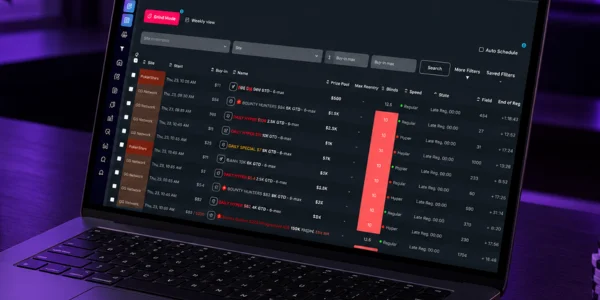
There are three ways to handle the same job, building your MTT schedule for the week, and each one costs you something different: the site’s own lobby, a spreadsheet you build yourself, or schedule management software. The right pick comes down to two variables: how many sites you play and how many times a week you rebuild your schedule. One site and fixed hours: the lobby gets it done. Two or three sites and hours that shift: the spreadsheet starts costing you in maintenance.
Beyond that, with series rotating in and out of the calendar every week, is where software starts saving you real time. The rest of this article shows you how to figure out which of the three cases you’re in, without relying on the gut feeling that “it works fine the way it is.”
What does schedule management software need to do to be worth the subscription?
It has to keep the sites’ real calendars up to date without you typing anything, filter that calendar by the criteria you actually use to pick tournaments, and show everything on a single timeline. If any of those three is missing, what you subscribed to is a prettier lobby.
Filtering is what separates a tool from a catalog. Filtering by buy-in is the bare minimum, and every lobby does it. What a lobby usually won’t take is a combination like this: buy-in between 5 and 22, start time between 6:30 and 9:30 PM, at least 6 levels of late reg, no hypers, GTD above a set amount, across three sites at once. That’s the real question anyone building a schedule is asking, and the difference between regular-speed, turbo, and hyper structures changes both how many tables you’ll have open at once and what time you’ll get to bed, so filtering by structure isn’t a cosmetic detail.
The second item is overlap projection. Twelve tournaments that fit your criteria can all start inside the same 40-minute window, and none of them is bad on its own: the problem is playing all twelve. A useful schedule tool shows you that cluster before you register, not after. The reasoning behind building your schedule ahead of time instead of registering on impulse is laid out in why use software to build your poker schedule, and it’s worth reading before you decide whether your problem is the tool or your criteria.
The third is updates. Sites change start times, series get added, tournaments drop off the calendar. If keeping that current depends on you, item 1 on this list doesn’t exist.
Managing your schedule from the site lobby: how far can you take it?
The lobby handles one specific scenario well: one site, one session a day, stable hours, and registration decided on the spot. Outside of that, it starts breaking down for three concrete reasons, and none of them is a missing feature: it’s simply what that screen is built for.
First, the lobby only covers one site. If you play two or three, there’s no screen that puts it all together, and comparing an $11 tournament on one site with a $9 one on another happens in your head while you alt-tab between windows. Second, the lobby sorts by “starting now,” because its goal is to get you to register now. That’s great for the site and bad for anyone planning their week. Third, it doesn’t remember anything: the filters you set up yesterday are gone today, and the tournament you played last week isn’t flagged.
That has a practical side effect. Picking from whatever is open right now is the shortest path to a schedule built on availability instead of criteria, a risk covered in detail in is it worth registering for poker tournaments at random. If you already know your criteria and just want the list, the step before choosing a tool is defining those criteria, and there’s a walkthrough for that in how to choose your poker tournament schedule.
The lobby is still the official source for start times and buy-ins. Any tool, a spreadsheet included, is a copy: when they don’t match, the lobby is the one that’s right.
Your own spreadsheet: what does it do well, and what does it cost you in maintenance?
A spreadsheet handles what’s yours and only yours: your criteria, your math, your notes. It charges you in data entry and repairs, and the bill comes due every time a site changes its calendar.
What a spreadsheet does really well: store buy-in, entries, prize, and notes for each tournament; calculate ROI and hourly rate the way you believe they should be calculated; keep bankroll separate from expenses; flag “I don’t play this one anymore” with the reason right next to it. None of that depends on anyone signing off on your method.
What it costs you: every new tournament goes in by hand. A series kicking off means an afternoon of data entry. Daylight saving time in another country shifts your start-time column, and you find out by missing late reg. Formulas break when someone inserts a row in the middle. And the most important data point, what’s on the site’s calendar today, isn’t in the spreadsheet: it only has what you typed in the last time you had the patience. A head-to-head comparison of the two approaches, with more detail on where each one stalls, is in poker schedule software vs. a spreadsheet.
There’s a simple test to check whether your spreadsheet is still alive: open the tournaments tab and look at when you last updated the start times. If it’s been more than two weeks and you’ve played during that stretch, you’re no longer using the spreadsheet to build your schedule, you’re using it to log results after the fact.
What does Lobbyze do that a spreadsheet doesn’t?
The structural difference comes down to one thing: Lobbyze works off the sites’ tournament calendars instead of working off whatever you typed in. Filters, schedule, and start times come from a database that doesn’t depend on your data-entry discipline.
In practice, that changes three moments in your day. When you build your schedule, you apply your filter once and get a list from the sites you play, already sorted by start time, instead of opening three lobbies. During series weeks, the new calendar shows up without an afternoon of data entry, and that’s the biggest gain of all, because it’s exactly when a spreadsheet falls out of date and when there are the most good tournaments running. When it’s time to play, your schedule exists before the session starts, which is what lets you know how many tables you’ll have open at 9 PM.
The spreadsheet doesn’t lose because it’s a spreadsheet: it loses because the data it needs changes every day, and nobody keeps that up by hand for very long. To see the kind of features a dedicated tool stacks up beyond filtering, check out poker tournament software.
If you typed lobbyz, lobyze, or lobby z, you’re looking for the same tool
The name is spelled Lobbyze, with two b’s and a z before the e. The searches that land here include lobbyze poker, lobbyz, lobby z, lobyze, lobbyzee, lobyzee, loby, lobby poker, and poker schedule, and they all point to the same place: an MTT schedule manager. The mix-up has an obvious source, the word lobby, which is the site screen where tournaments are listed, and that’s exactly what the tool replaces as the starting point for building your schedule. If you got here by typing any of those variations, this is what you were looking for, and the Lobbyze blog index collects the articles on scheduling, tournament structure, and study routines.
Where does a spreadsheet still beat software?
A spreadsheet wins on four counts, and they’re real ones, not polite concessions: cost, customization, data ownership, and coverage. If you’re deciding honestly, you need to weigh all four.
Cost: a spreadsheet is free and never renews. If your volume is two $5 tournaments a day, the time any subscription saves you may be worth less than the subscription itself, and that math shifts depending on the stakes you play.
Customization: no software is going to calculate things exactly your way. If you want to split ROI by field size, take rakeback out before your net result, count satellites as an expense of the target tournament, and then cross-reference all of that with how many hours you slept, the spreadsheet can do it and the tool can’t. Calculating your hourly rate in tournaments is a good example of math almost every grinder wants to do with their own criteria.
Data ownership: a spreadsheet is your file, it opens offline, goes wherever you take it, and doesn’t change format because someone updated the product. For the review side of your routine, the part where you look back and decide what to fix, that matters a lot, and how to structure that process is covered in how to review a poker session.
Coverage: software depends on your site being supported. A spreadsheet works with any site, including small regional ones, because you’re the data source. This is the criterion that settles the question before any other: if the site where most of your volume is isn’t covered, the rest of the comparison doesn’t matter.

Side-by-side comparison of the three options
| Criterion | Schedule management software | Your own spreadsheet | Site lobby |
|---|---|---|---|
| Up-to-date site calendars | Updates without any data entry from you | Only what you typed in at your last update | Always current, but one site at a time |
| Combined filters (buy-in, structure, start time) | All criteria applied at once | Possible, if you keep the columns filled in | Basic filters that reset when you close the window |
| Multiple sites on one timeline | Yes, it’s the core feature | Yes, with manual data entry for all three | No, one site per window |
| Maintenance that eats your time | Initial filter setup | Recurring data entry and formula fixes | None, because nothing is saved |
| Custom calculations | Limited to what the product offers | Unlimited, quirky formulas included | Not applicable, the lobby doesn’t track your results |
| History of what you’ve played | Depends on your plan | Stays in the file, under your control | Only the site’s own transaction history |
| Works offline | No, needs a connection | Yes, it’s a local file | No, needs a connection |
| Depends on your site being covered | Yes, check before subscribing | No, you can add any site | Not applicable, it’s the site you’re already on |
How much time per week does each option take to build your schedule?
There’s no universal number, and anyone who gives you one is guessing. What you can do is run the numbers on your own data over one week, and it doesn’t take long.
Track three things for seven days: the minutes per day you spend deciding what to register for; the minutes per week you spend updating your spreadsheet or list; and how many times you registered for a tournament that didn’t meet your criteria just because it was starting. The third one is the most expensive of the three and the one nobody measures.
Once you have the numbers, the decision is simple arithmetic. If it adds up to 20 minutes a week, subscribing to software is buying convenience, and it’s fine to call it that. If it adds up to two hours, the annual cost of the subscription matters less than the time. And if the third item shows up more than twice a week, the problem is the order in which you make decisions, and switching tools without locking in your criteria first just puts a nicer interface on the same habit. There’s no reliable benchmark for what a normal week looks like, so your own numbers are the yardstick.
How do you move from a spreadsheet to software without losing your history?
Split the two jobs your spreadsheet has piled up: what’s coming up and what’s already happened. The software takes over building your upcoming schedule; the spreadsheet keeps storing your history, and you don’t convert anything on day one.
The sequence that saves you from redoing work has five steps. First, save a copy of the spreadsheet with the date in the file name and store it off your playing computer: that file is your history and you don’t touch it again. Second, export the results tab to CSV, because that’s the format that survives any tool change three years from now. Third, define the key that uniquely identifies a tournament, date plus site plus name plus buy-in, and standardize it on both ends: without a key, matching old data with new data later is impossible. Fourth, run both in parallel for four weeks, building your schedule in the software and double-checking two or three start times in the site lobby before registering. Fifth, only stop maintaining the spreadsheet once four weeks have gone by with no discrepancies.
During series weeks, double-checking matters more, because that’s when the calendar changes fastest and a mistake costs you a missed late reg. Handling a series with your schedule ready in minutes is the case that most exposes the difference between the two methods, and the step-by-step for it is in poker series with your schedule built in minutes.
How should you test before subscribing to anything?
Recreate a real week, not a quick tour of the interface. The test comes down to one central question: does the tool build the schedule I would build, on the sites where my volume is?
Check in this order, because the first fail ends the test. Are your sites in the database? Do your filters actually exist, including the ones you rely on that nobody advertises, like minimum late reg and excluding hypers? Does the schedule it spits out match the lobby on start times and buy-ins for three tournaments you checked by hand? Does the tool show you overlapping start times before you register? And during the test week, were you able to build your schedule faster than before, measured, not estimated?
One detail people tend to miss: test on the day your routine is at its worst, not on a Sunday afternoon with time to spare. A tool proves itself on a Tuesday night, with 20 minutes between work and your first tournament. To compare what the tool gives you against the raw list for the day, the page with today’s online poker tournament schedule by site works as a quick reference to double-check.
Conclusion: the right order to make the decision
The question doesn’t start with which of the three options is best, it starts with how many sites and how many different time slots you play. One site and fixed hours: the lobby already does the job, and subscribing to anything is money spent with nothing in return. Volume spread across two or three sites, with a series week in the mix: the cost of a spreadsheet shows up as outdated data right when the calendar is busiest, and that’s where schedule management software earns its keep. If your main site isn’t covered by the tool, the decision is already made, and it’s called a spreadsheet, no feature debate needed.
And the part none of the three solves: criteria. Good filters applied to bad criteria just produce a bad schedule faster. First define what kind of tournaments you play and why; then choose what’s going to list them for you.
Frequently asked questions
Where can I find the tournament schedule and filter by the game type and buy-in I want before registering?
In the site lobby if you only play one site, and in a schedule tool if you play several. The lobby filters by buy-in and game type, but it drops your filters when you close the window and doesn’t show other sites. A schedule tool saves your combination of criteria and gives you the same list every day, which is the whole point when you want to decide ahead of time and not on the fly.
Is there a platform that sends tournament alerts by email?
Whether you get tournament alerts by email or notification depends on the site and the tool, and it varies, so check the notification settings on each one. What works without relying on alerts is having your schedule built before the session, with start times you’ve already double-checked: that way your reminder is your own schedule, not an email that might show up late.
What does grind mean in poker?
Grinding means playing with volume and consistency, session after session, treating your results as an average over lots of tournaments instead of the outcome of a single night. In MTTs, that means running the same tournament schedule with stable criteria for weeks, which is exactly the task a spreadsheet, a lobby, or software is trying to organize.
Is it Lobbyze, lobbyz, or lobyze?
The correct spelling is Lobbyze. The variations lobbyz, lobby z, lobyze, lobbyzee, lobyzee, and loby show up a lot in searches because the name looks like the word lobby, the screen where a site lists its tournaments. They all lead to the same product, an MTT tournament schedule manager.
Do I need to pay to build a tournament schedule?
No. You can build a schedule for free with the site lobby and a spreadsheet, and for low volume on a single site, that’s the most sensible choice. Paying makes sense when the time you spend maintaining the spreadsheet, measured by you over a week, starts costing more than the subscription, or when an outdated calendar starts making you miss tournaments.
Do poker sites allow schedule software?
Tools that only organize and filter the tournament calendar are a different kind of thing from tools that work during a hand, but the rule that counts is the one from the site you play on, and it’s spelled out in each operator’s terms of service and list of permitted software. Check that list on your main site before subscribing to anything.